Graphite Layout on Corne Keyboard
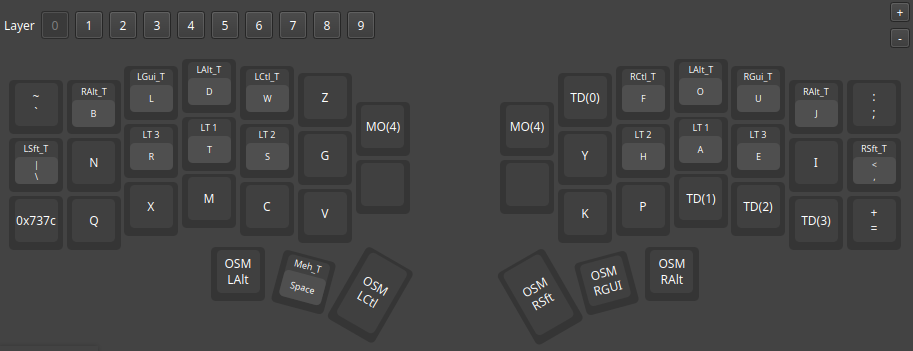
I’ve been using the Graphite keyboard layout on my ZSA Voyager keyboard for a few weeks now, and I’m fairly happy with it. I therefore decided to update the keymap of my Corne keyboard (which is for me is now a backup keyboard) from the Gallium keyboard layout to the Graphite layout.
As I mentioned previously , the punctuation symbols in a standard Graphite layout require the use of key overrides. By default, the Voyager web configuration tool doesn’t support key overrides, and so I implemented a solution using tap dance. For the Corne keyboard, I am using the Vial configuration tool which does support key overrides, and so I tried to set this up.
The key overrides on the Corne keyboard worked well, except for the comma on the right outer column of the home row. I couldn’t set up a key override on that key because it is configured to be a SHIFT key when it is held down. It seems that Quantum keys like that are incompatible with defining key override.
I could have removed the shift function from that key, but then I decided to use a tap-dance setup like I did on my Voyager keyboard, so that the Corne would behave in a similar way. Because the Corne has only 3 rows instead of 4 (ie. there is no number row at the top), I had to reassign a couple of the keys to compensate. This is a layout I ended up with:
| |
Some remarks:
- The
CWkey is the CAPS WORD, moved from the number row down to the bottom row. Similarly the=/+key was moved from the number row down to the bottom row. - The keys with
',.,-and/were defined as tap-dance keys that, when held, output_,>,"and<respectively. - The outer column keys on the bottom row were one-shot Left-Alt and Right-Alt keys, and those got moved to the outer thumb keys to make room for
CWand=+ - The space (
SP), Left-Ctrl (LC), Right-Shift (RS) and Right-Gui (RG) thumb keys are the same as on my voyager.
On my GitHub
you can find a link to the corresponding Vial Layout file graphite_homerow_layer.vil
.