My AI Teaching Setup, Part 0: A Life in Plain Text
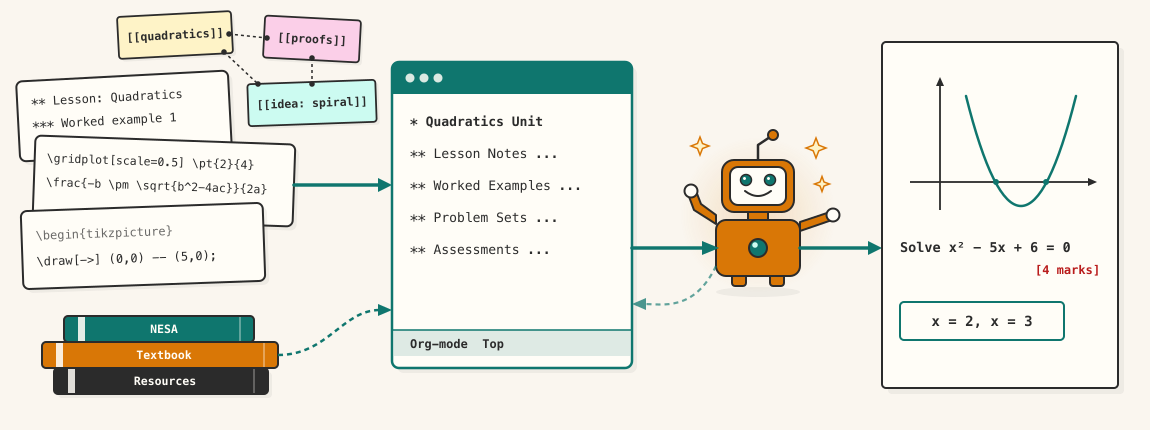
This is the first of a few articles about the AI system I use for teaching maths. Basically, ten months ago I decided to buy an AI subscription to learn more about the technology, and today I run a small fleet of machines and agents that draft my lessons, check my exams, index my syllabus, and argue with me about design at midnight. This first article is about the recent years before any of that, because it turns out to be the part that made everything else possible.
Years of LaTeX
I have written almost every teaching document of my career in LaTeX. It started with my teaching degree, the Master of Teaching, which is a requirement to become a qualified teacher in my home state. I had used typesetting packages for academic documents before, such as Lout , and I knew the power of focusing on the content while the tools take care of the presentation. In particular, we had to use the APA referencing system for any citations in our assignments, and rather than fiddle around trying to work out if I need italics here or a comma there, I decided to outsource it to LaTeX, an industry standard for typesetting mathematics.
After graduating, I studied the lesson notes produced by other teachers at my school, and decided I wanted to develop my own style, where the example images were not fixed immutable bitmaps, but rather were described in LaTeX code I could more easily change and adapt. It was slow work at first, but eventually it grew into my own house style: lesson notes, worksheets, assessment tasks, all of it text files that compile to PDF. This choice is the least glamorous and most consequential decision in the story. Little by little, my professional output — every lesson, every question, every mark allocation — has been migrating towards plain text in folders.
The cost of that choice was of course time. LaTeX is particular, and the diagrams are worse. Drawing one number line with labelled fractions, or a circle divided for fraction introduction, could take twenty minutes of TikZ fiddling — coordinates, anchors, overlapping labels, the small talk of vector graphics. And the diagrams matter: I lean heavily on dual coding, getting the algebra and the picture to reinforce each other, so “skip the diagram” was never an option. The TikZ tax was just a fact of life, paid every lesson-planning session.
Some of this was mitigated by using a powerful text editor called Emacs, which provides a variety of keyboard shortcuts and auto-completion features to eliminate some of the drudgery. I had been dabbling with Emacs for many years, often falling back to the Vi editor I was more familiar with. It was during my teaching degree that I decided to go all out to learn the Emacs editor properly, and as I learned I discovered that Emacs is much more than a simple text editor.
An Org-mode brain
As I searched around for productivity systems to help me organise my work, I learned about various systems such as Getting Things Done , Zettelkasten and Obsidian , and I realised that all of this was possible to do in plain text using Emacs’ Org mode : my notes, tasks, calendar, knowledge base and lesson plans are all text files, cross-linked zettelkasten style. Teaching knowledge — NESA outcomes, syllabus quirks, which explanation worked for which topic — accumulated in thousands of small linked notes.
At the time this was just me being a text obsessive with an Emacs-shaped habit. It did not occur to me that I was building towards anything.
The background I should confess
Before teaching I spent years as a trained electrical engineer and computer scientist, specialising mostly in software, and I have been a computer hobbyist for as long as I can remember. Networking, terminals, a bit of neural-network theory from my undergraduate days when it was still a niche subject (one highlight was when Geoffrey Hinton himself came to talk at the university) — none of it was unusual then, and none of it prepared me specifically for what happened in 2026. I mention it only because it smoothed the early road, and because the road got smoother still, for reasons that become the point of this whole series: the technical parts turned out to be the parts I could delegate.
The first hours back
The first thing AI ever did for me was help me with LaTeX TikZ diagrams. I had made extensive use of Stack Exchange , an internet forum full of helpful tips. Knowing that the AI had probably ingested that site, I tried describing diagrams in a sentence to see what it would come back with. It produced diagrams full of coordinates, and with a bit of further prompting, would even generalise the code so I could feed in some parameters to modify the diagram on the spot. Twenty minutes became two, and the two usually gave better results, because the AI remembered anchor tricks I had forgotten or was not even aware of. Then it was the LaTeX prose, the question wording, the “make this part harder but keep the marks the same” requests that used to be an hour of careful surgery.
And here is the quiet realisation that this series keeps circling back to: I never had an integration project. When AI tools arrived, they could already read my entire professional life, all laid out in plain text. No PDF wrangling, no proprietary formats, no export step — the lessons, the notes, the brain itself were text files, and text is what these tools eat. People ask me how I got my knowledge into the AI. I didn’t. I had been writing it in the AI’s native language for years. I just had to point the AI at it.
That is the lesson of Part 0, and I did not earn it deliberately: build your working life in plain text. Not because AI is coming — although it is — but because text compounds. It links, it diffs, GitHub loves it, and it survives every vendor. Then, one day it turns out to be the foundation everything else gets built on.
Next: Part 1 — Rented Intelligence. The subscriptions that started it, the anxieties that followed, and the sacred first duty of an eight-gigabyte graphics card.